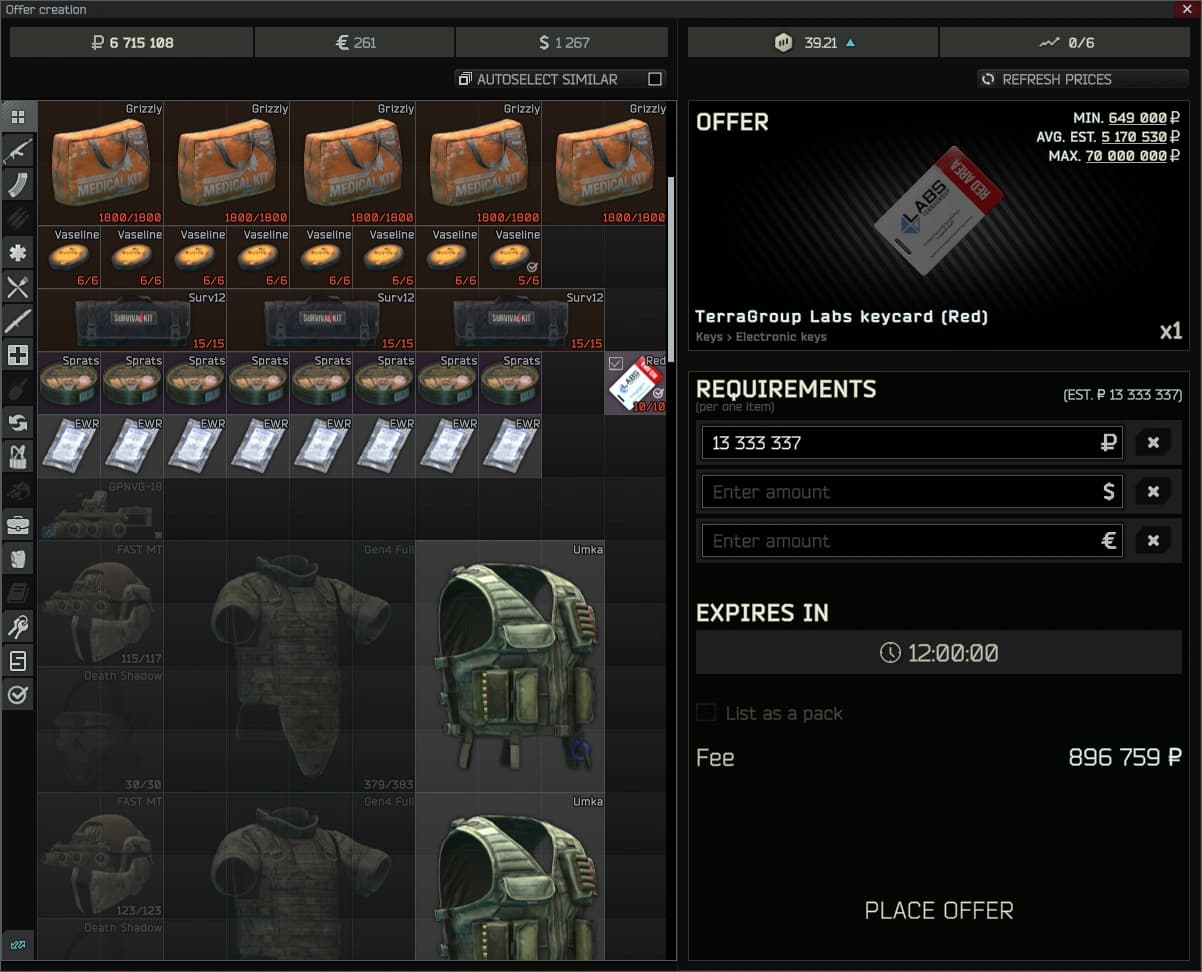
New players often open the flea market, find the button greyed out, and wonder what they did wrong. Usually nothing. The flea has a few rules that block listing until you meet them.
The trouble is that the game rarely tells you which rule is in the way. A greyed out button looks the same whether you are too low level, out of offer slots, or trying to sell the wrong kind of item. This guide goes through each rule in turn, explains why it exists, and ends with a checklist you can run through the next time a listing will not go up.
The level requirement
The flea market unlocks at a set character level. Until then, you cannot buy or sell there at all. The required level has changed between versions of the game, so go by the message the flea shows you.
If you open the flea tab before you reach that level, the game tells you the level you need. That message is the one to trust. Guides, videos and forum posts from earlier versions may quote a different number, and some of them are out of date.
The reason for the gate is to slow down new accounts. Without it, a fresh account could skip the early game and buy whatever it wanted on day one. Until you reach the level, sell to traders instead, and keep anything valuable that you expect to sell later. Most of it will still be worth roubles once the flea opens to you.
Found in raid
Most items can only be listed if they are marked found in raid: looted in a raid and carried out, or produced by the scav case or a hideout craft. Items you bought from traders or other players lose that mark and can only be sold to traders.
Found in raid, often shortened to FIR, is a status shown on the item itself. Inspect an item in your stash and look for the found in raid mark. If it is there, the flea will usually accept the item. If it is not, the flea will refuse it, no matter how valuable it is.
This rule exists to stop people from buying cheap from traders and reselling on the flea in endless loops. Tying flea sales to items that came out of the game world keeps more of the economy tied to actual raids.
A few things catch players out here. If you die in a raid, the items you brought in are lost or come back without the mark. If you take an item into a raid and bring it back out without it being looted there, it does not gain the mark. And anything you buy, even from the flea itself, loses the mark, so you cannot flip it straight back. If you want to know whether a specific item can be listed, inspect it before you try.
Offer slots
You can only have a limited number of offers up at once. New players get a few slots, and more open up as your flea market rating rises. When every slot is in use, the Add Offer button greys out until an offer sells or you cancel one.
Your rating grows as your offers sell. The exact number of slots at each rating has changed over time, so check the flea itself to see how many you have. The count of your active offers and your limit appear on the flea screen, and that is the fastest way to tell whether slots are the problem.
If the button is greyed out and you are past the level requirement with a found in raid item in hand, full slots are the most likely cause. Open your own offers, look at what is still unsold, and decide whether to wait or cancel something that is priced too high.
Listing fees
Each offer costs a fee, paid when you place it and not refunded if you cancel. The fee grows when you ask much more than the item's usual value, so a huge fee usually means your price is too high.
The fee is shown on the offer screen before you confirm. If you do not have enough roubles to cover it, you cannot place the offer. That is a quiet way to get stuck early on: the item qualifies, a slot is free, but your rouble balance is too low for the fee.
The fee rule is there to stop players from listing items at silly prices and leaving them up for days. When your price is close to what the item normally goes for, the fee stays modest. When you push the price well above that, the fee climbs fast. If the number looks wrong, lower your price and watch the fee drop.
Because the fee is not refunded, cancelling an offer has a real cost. Getting the price right the first time saves money. Look at the cheapest current offers for the same item before you set yours, and price a little under them if you want a fast sale.
Banned items
Some items cannot be sold on the flea at all, whatever your level. The game blocks them so players cannot simply buy their way into the best gear.
The banned list changes between patches. Items that sold freely one wipe may be blocked the next, and the reverse happens too. If an item has the found in raid mark and you still cannot list it, it may be on the current ban list. Trying to add it to an offer is usually the quickest check, since the flea will not let you pick it.
Quest items are a related case. Items that exist only for a trader task are generally not something you can put on the market. If an item will not go into an offer and it came from a quest, that is likely why.
Smaller things that block a listing
A few less common problems can stop an offer even when everything above checks out. Containers that still hold items, such as a backpack or a case with loot inside, generally need to be emptied before they can be listed. Take everything out and try again.
Items in use can also cause trouble. If something is equipped on your character or sitting inside another item, move it into your stash on its own first. That makes it easier to select, and it rules out the item being attached to something the flea will not accept.
Finally, the flea can be affected by server problems or by changes from the developers during events. If nothing will list and you have checked everything else, look at the official channels for news before assuming you did something wrong.
A worked example
Here is a made-up example to show how the checks fit together. The details are invented for illustration, not taken from the current game.
Say you have just reached the flea level and want to sell a rifle scope you looted, a stack of ammo you bought from a trader, and a backpack full of loot. The scope has the found in raid mark, so it qualifies. The ammo was bought, so it has no mark and can only go to a trader. The backpack is found in raid, but it is full, so you empty it first.
You list the scope and the backpack. That uses two of your slots. You try a third item and the button greys out: you only had two slots free. So you wait for one of the two offers to sell, or you cancel one. The ammo goes to a trader for whatever they pay. Nothing was broken. Each item simply hit a different rule.
Early wipe versus late wipe
Early in a wipe, everyone is low level. Many players cannot use the flea yet, and those who can have few offer slots and low ratings. Expect fewer listings, wild prices on some items, and a lot of time spent selling to traders until you reach the level.
Later in the wipe, more players have unlocked the flea, have higher ratings, and have more slots. Prices tend to settle, competition on popular items is stronger, and your own slot count may be the main thing holding you back. At that stage, keeping every slot in use with sensibly priced offers matters more than chasing high prices.
A quick checklist
When an offer will not go up, run through these in order:
1. Are you at the level the flea asks for? If the flea shows a level message, that is the answer.
2. Does the item have the found in raid mark? Inspect it. No mark means trader only.
3. Do you have a free offer slot? Compare your active offers with your limit on the flea screen.
4. Can you afford the fee? Check the fee on the offer screen and your rouble balance.
5. Is the item on the ban list or a quest item? If it cannot be selected at all, that is the likely cause.
6. Is it a container with something inside, or an item that is equipped or attached to something else? Empty it or move it to the stash first.
Quick questions
Why does the fee look so high? Your price is probably well above the item's usual value. Lower it and the fee drops.
Do I get my fee back if I cancel? No. The fee is paid when the offer is placed and is not refunded.
Can I sell items I bought on the flea? Not back on the flea. Bought items lose the found in raid mark, so you can only sell them to traders.
How do I get more offer slots? Sell on the flea. Your rating rises as offers sell, and more slots open as it climbs.
Why is the button greyed out when I have slots free? Check the other rules: the item may not be found in raid, it may be banned, or you may not have enough roubles for the fee.
Once you are past the level gate and have a stash of found in raid loot, the main limit for most players is offer slots. Keeping them full means watching for sales, cancelling stale offers, and listing the next item as soon as a slot frees up. Some players do that by hand, and some use a tool such as Tarkbot that waits for a free slot and lists the next item when one opens.